How to Check Your Ethiopian University Exit Exam (EUEE) Result Online
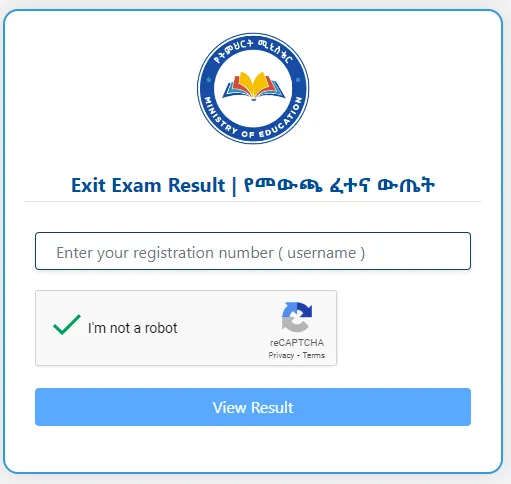
Table of Contents
The long nights of studying are finally over. You have successfully navigated the identity verification process, sat through the intense exam sessions, and handed in your digital answers. Now, the waiting game begins.
For hundreds of thousands of prospective graduates across Ethiopia, the question is now the same: “When will the Exit Exam results be released, and how do I check them?”
We know that the period between finishing the exam and seeing your score can be nerve-wracking. To help you stay calm and prepared, we have put together this complete guide on how to access your Ethiopian University Exit Exam (EUEE) results as soon as they drop.
Here is everything you need to know about checking your score, understanding the grading system, and troubleshooting common issues.
Where to Look: The Official Channels
The Ministry of Education (MoE) typically releases the results through two primary channels. It is important to rely only on these official sources to avoid scams or fake links circulating on social media.
1. The Student Result Portal
This is the main method. The Ministry usually activates a specific subdomain for results. While the link can sometimes be updated for each academic year, it is generally hosted on the Ethernet educational network.
- Likely URL: result.ethernet.edu.et (or eaes.et for general assessment services).
2. The Official Telegram Bot
In recent years, to reduce the load on the website, the MoE has also allowed students to check results via an official Telegram bot. This is often faster if the website is crashing due to high traffic.
Step-by-Step: How to Check Your Result
When the Ministry announces that results are live, follow these steps to access your scorecard.
Step 1: Gather Your Credentials
You cannot check your result by name alone. You will need the specific ID number you used during the exam.
- Registration Number / User ID: This is usually the ID provided by your university or the unique username you were given to log into the exam platform.
- Fayda Number: Since the system is now integrated with the National ID, keep your Fayda number handy just in case the portal requires it for verification.
Step 2: Access the Portal
Open your web browser and go to the official result link provided by the Ministry.
- Pro Tip: If the page doesn’t load immediately, do not panic. When 200,000+ students try to log in at the exact same second, servers can get overwhelmed. Wait 5 minutes and refresh the page.
Step 3: Input Your Data
Enter your ID/Registration number in the search box. Double-check for typos. A single wrong digit will return a "No Record Found" error, which can cause unnecessary heart attacks!
Step 4: View and Save
Once you click "Search" or "Check," your result should appear. It will typically display:
- Your Full Name
- Your University and Department
- Your Total Score (usually out of 100)
- Status: Pass / Fail
Recommendation: Take a screenshot or print the page immediately for your records.
Understanding the "Magic Number": The Passing Mark
For the past few rounds of the Exit Exam, the Ministry of Education has set the passing mark at 50%.
- If you score 50 or above: Congratulations! You have formally passed the exit exam. This means you are eligible to receive your original degree certificate from your university. You can now proceed with clearing and graduation formalities.
- If you score below 50: Take a deep breath. Failing the exit exam does not mean you lose your degree entirely. It means you are currently not eligible for the original certification. However, the Ministry provides opportunities for re-exams. You will have chances to sit for the exam again in the next round (usually after 6 months or the following academic year).
Troubleshooting Common Issues
"Result Not Found"
If you see this message, don't assume you failed.
- Check your ID number again. Did you include the slashes (e.g., UGR/1234/15)? Try removing them or adding them.
- Your university might not have uploaded your specific data batch yet. Wait for a few hours.
- If the problem persists for 24 hours, contact your university registrar.
The Website is Blank or "502 Bad Gateway"
This is a classic server error caused by too much traffic. It’s not an issue with your result; it’s an issue with the website. Try checking late at night or very early in the morning when fewer people are online.
"Incomplete" Result
In rare cases, a result might be flagged as withheld or incomplete due to technical glitches during the exam (e.g., computer crashes) or suspected malpractice. If your result is withheld, you must contact your exam center coordinator immediately.
A Final Word of Advice
While you wait for the announcement, ensure you are following the official Ministry of Education pages on Facebook or Telegram. Do not click on random links that promise "early access" to results—these are often phishing sites trying to steal your personal data.
Whether you are looking to join the workforce, start your own business, or pursue a Master's degree, this result is just one milestone in your long journey.
We are rooting for you! Keep refreshing (gently), and good luck!
Zehulu Educational Team
VerifiedExam Preparation Specialists & Curriculum Experts
Our content is researched, written, and fact-checked by Ethiopian educators with extensive experience in national examination preparation, curriculum alignment, and academic coaching.
MoE Curriculum Trained | 5+ Years Teaching Experience